How Internal Linking Improves SEO
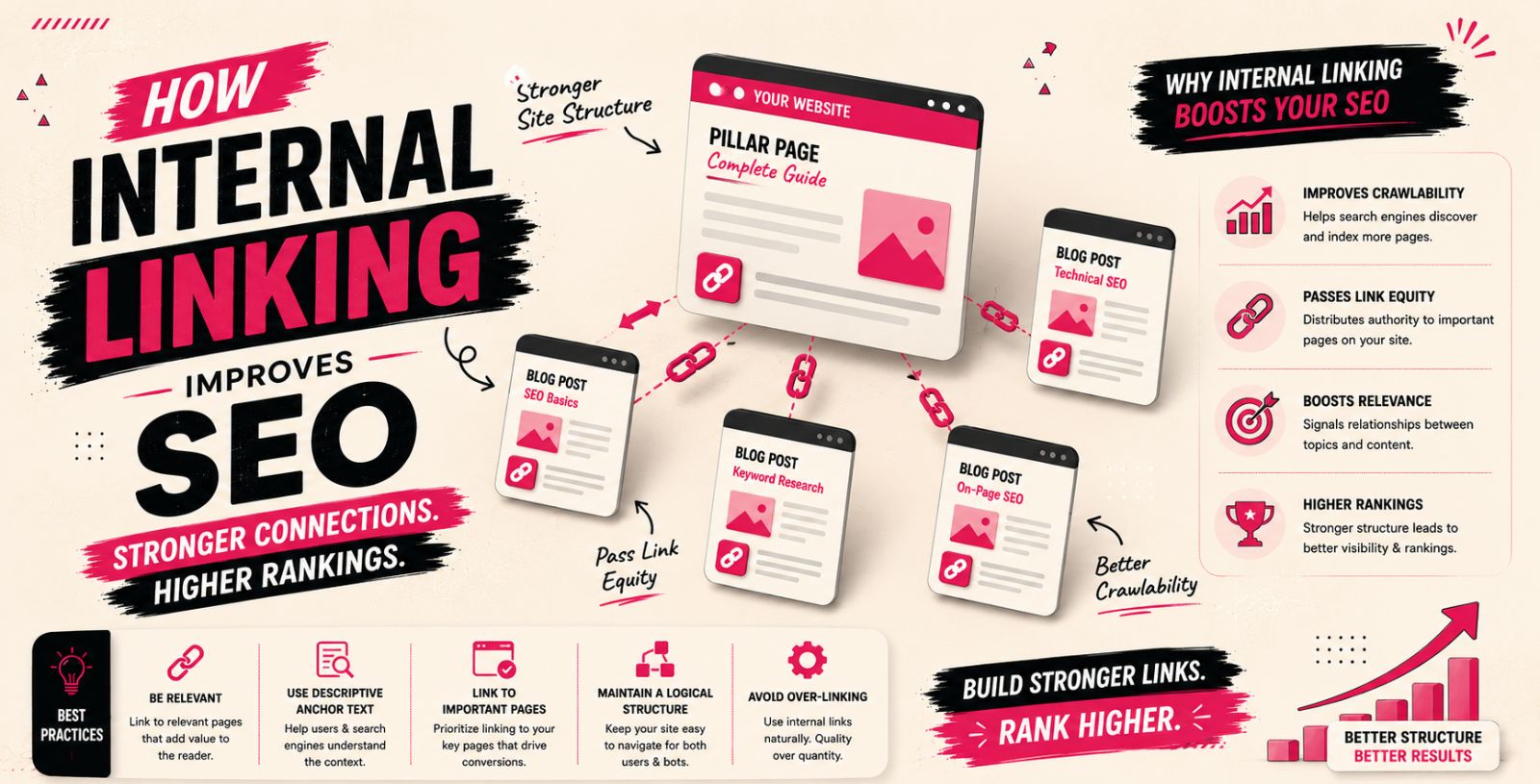
A successful website is built with multiple pages that work together to provide valuable information to users. However, creating content alone is not enough. Search engines also need to understand how different pages connect and which content is most important.
Internal linking helps create these connections by linking relevant pages within the same website. These links guide users towards additional information while helping search engines discover and understand your website structure.
A well-planned internal linking strategy improves website navigation, strengthens page relationships, distributes SEO value, and helps important pages gain better visibility in search results.
Why Website Structure Matters for SEO
Website structure plays an important role in how search engines crawl and understand your content. A well-organised website makes it easier for search engines to discover pages and understand the relationship between different topics.
When pages are properly connected, search engines can identify important sections of your website and understand how information is organised.
A strong website structure helps:
Improve page discovery
Make navigation easier
Create clear relationships between content
Help users find relevant information quickly
Internal linking supports website structure by creating pathways between related pages and making your content easier to access.
What Is Internal Linking in SEO?
Internal linking is the process of linking one page of a website to another page on the same domain. These links connect related content and help users move between different sections of a website.
For example, a blog post about on-page SEO can naturally link to another article explaining keyword research or technical SEO. This helps readers find additional information while showing search engines that these pages are related.
Internal links can connect:
Blog articles
Service pages
Product pages
Category pages
Landing pages
Resource guides
Unlike external links, internal links stay within your own website, allowing you to control how users and search engines navigate your content.
Why Is Internal Linking Important for SEO?
Internal linking provides valuable signals to search engines about your website structure and content relationships. It helps search engines understand which pages are important and how different topics are connected.
A strong internal linking strategy can help:
Improve website crawling
Increase page visibility
Support keyword rankings
Distribute page authority
Improve user experience
Internal linking is also one of the SEO activities that website owners can control directly. By creating meaningful connections between pages, you can improve the way search engines understand your website.
How Internal Linking Improves SEO
Helps Search Engines Discover Important Pages
Search engines use links to discover and crawl website pages. Internal links create pathways that help search engines find content that may not be easily discovered through navigation alone.
When an important page receives internal links from relevant content, search engines can better understand its importance and relationship with other pages.
Internal linking helps search engines:
Discover new content
Crawl deeper pages
Understand website hierarchy
Identify important resources
For example, a detailed SEO guide can link to supporting articles about title tags, meta descriptions, or internal linking strategies. These connections help search engines understand the relationship between related topics.
Distributes SEO Value Across Pages
Internal links help distribute authority and SEO value throughout your website. When a page receives strong external signals, internal links can help pass some value to other relevant pages.
For example, a high-performing blog article about SEO basics can link to a more detailed guide about technical SEO. This helps users discover additional information while creating a stronger connection between related pages.
Effective internal linking can:
Strengthen important pages
Improve visibility of deeper pages
Support ranking opportunities
Create a balanced website structure
Internal links should always be added naturally and should improve the user experience.
Improves User Navigation
Internal links help visitors move through your website and find more relevant information. Instead of leaving after reading one page, users can continue exploring related content.
Better navigation helps:
Increase time spent on the website
Improve user engagement
Make information easier to find
Create a smoother browsing experience
For example, an article explaining SEO mistakes can link to another guide about SEO best practices, helping users continue learning about the topic.
Helps Search Engines Understand Content Relationships
Internal links provide context about how different pages are connected. They help search engines understand your website topics and identify relationships between related content.
When multiple pages link to each other naturally, search engines can better understand the depth of information available on your website.
For example, a website publishing SEO content may connect articles about keyword research, content optimisation, technical SEO, and link building. These connections help create a stronger topical structure.
Supports Keyword Rankings Through Anchor Text
Anchor text is the clickable text used in an internal link. It helps users understand what they will find after clicking and provides additional information to search engines.
Effective anchor text should:
Clearly describe the linked page
Match the surrounding content
Use keywords naturally
Avoid repetitive wording
For example:
Good:
Learn more about technical SEO strategies.
Poor:
Click here.
Descriptive anchor text improves usability and helps search engines understand page relevance.
Types of Internal Links
Contextual Links
Contextual links are placed naturally within website content, such as blog posts, guides, and informational pages.
These links connect related topics and help users discover additional information while reading.
For example, a blog article about content optimisation can link to a related guide about keyword research or search intent.
Navigation Links
Navigation links help users access important sections of a website. These links are usually found in:
Main navigation menus
Footer sections
Sidebar areas
They improve website usability and help search engines understand important pages.
Breadcrumb Links
Breadcrumb links show users their location within a website structure. They usually appear near the top of a page and display the path from the homepage to the current page.
Breadcrumbs help:
Improve website navigation
Show page hierarchy
Support better crawling
Related Content Links
Related content links recommend additional pages that users may find helpful. These links are commonly added at the end of articles or within resource sections.
They encourage visitors to explore more content and increase engagement.
Internal Linking Best Practices
Use Relevant Links
Internal links should always connect related content. Adding irrelevant links can confuse users and reduce the effectiveness of your content.
Every internal link should provide additional value and help users find useful information.
Use Descriptive Anchor Text
Avoid generic anchor text such as "click here" because it does not explain what users will find after clicking.
Use descriptive phrases that clearly explain the linked content.
Link to Important Pages
Important pages should receive internal links from relevant sections of your website.
These may include:
Main service pages
Important guides
Product pages
Key landing pages
Strategic linking helps improve visibility for pages that are valuable to your business.
Avoid Excessive Internal Links
Adding too many internal links can make content difficult to read and reduce the value of each link.
Focus on quality rather than quantity. Add links only when they naturally support the user's journey.
Fix Broken Internal Links
Broken internal links can create a poor user experience and prevent search engines from properly crawling your website.
Regularly check for:
Broken URLs
Redirect issues
Removed pages
Outdated links
Maintaining healthy internal links helps keep your website structure strong.
Common Internal Linking Mistakes to Avoid
Adding Too Many Links
Adding excessive internal links can make content appear unnatural and overwhelm visitors.
Focus on adding links that genuinely help users find relevant information.
Using Generic Anchor Text
Using phrases like "click here" provides little information about the linked page.
Use clear and descriptive anchor text that explains the destination page.
Ignoring Important Pages
Some websites fail to link to valuable pages, which can reduce their visibility in search results.
Make sure important pages receive relevant internal links from related content.
Linking Only to the Homepage
Many websites focus heavily on homepage links while ignoring deeper pages.
A strong internal linking strategy should distribute links across different valuable pages.
Not Updating Internal Links
Websites change over time, and old internal links may become outdated.
Regularly review your content to update links and maintain a useful website structure.
How Often Should You Review Internal Links?
Internal linking should be reviewed regularly to ensure links remain useful, accurate, and relevant.
Review Links When Publishing New Content
Every new page creates opportunities to add internal links to existing content.
Adding relevant connections helps improve content discovery and strengthens website structure.
Update Links During Content Refreshes
When updating older content, review existing internal links and add new connections where necessary.
This helps maintain content relevance and improves user experience.
Check for Broken or Outdated Links
Regularly check your website for broken links, removed pages, or outdated references.
Fixing these issues helps maintain a healthy website and supports better crawling.
Final Thoughts
Internal linking is an essential part of SEO that improves website structure, helps search engines discover content, and creates a better experience for users.
By connecting related pages with relevant links and descriptive anchor text, you can improve crawlability, distribute authority, and help important pages gain more visibility.
A strong internal linking strategy benefits both search engines and users. It makes your website easier to navigate, improves content relationships, and supports long-term SEO growth.
FAQs
What is internal linking in SEO?
Internal linking is the process of linking one page of a website to another page on the same website. It helps users navigate content and helps search engines understand website structure.
How does internal linking improve SEO?
Internal linking improves SEO by helping search engines discover pages, distributing authority, improving navigation, and showing relationships between website content.
How many internal links should a page have?
There is no fixed number of internal links required. The ideal number depends on the content length, page purpose, and whether the links provide value to users.
Does internal linking help Google rankings?
Yes, internal linking can support better rankings by improving crawlability, strengthening page relationships, and helping search engines understand important content.
What is the best anchor text for internal links?
The best anchor text is descriptive, relevant, and naturally explains the linked content without excessive keyword usage.
1. Improve Website Navigation

2. Help Search Engines Discover Pages

3. Distribute Page Authority
4. Build a Strong Website Structure
5. Support Keyword Rankings
6. Increase User Engagement
In short: Internal linking improves SEO by creating better connections between website pages, helping search engines discover content, and improving overall website structure. It also supports rankings, distributes page authority, and helps users navigate your website more easily.