How to Optimise Every Page for Better Google Rankings
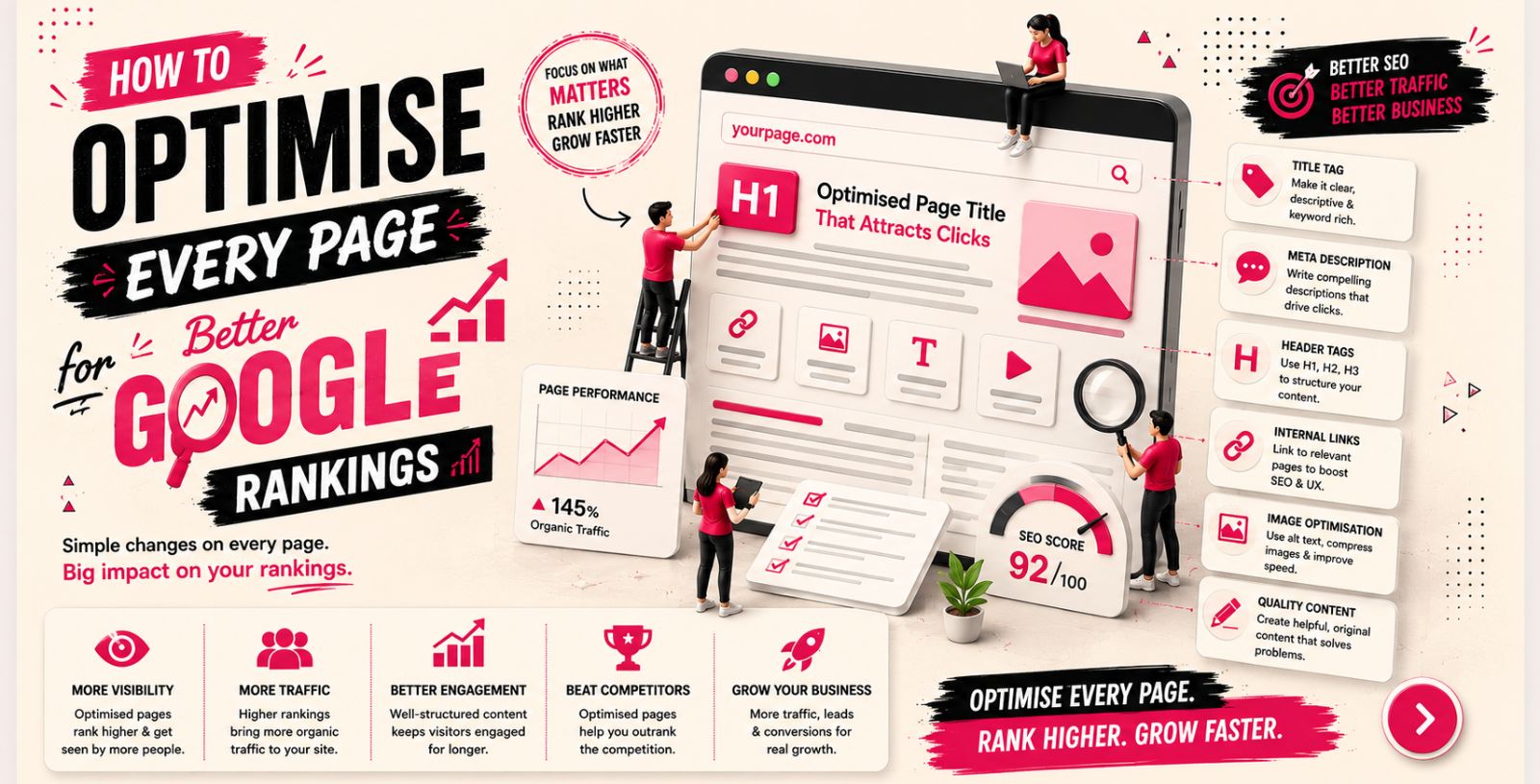
Every page on your website has the potential to rank in Google and attract valuable organic traffic. However, simply publishing content is not enough. Search engines evaluate many factors before deciding where a page should appear in search results, including content quality, keyword relevance, user experience, page speed, and technical SEO.
Optimising each page helps search engines understand your content while making it easier for visitors to find the information they need. Whether you're creating a new page or improving an existing one, following SEO best practices can significantly improve your website's visibility and long-term performance.
This guide explains how to optimise every page for better Google rankings using proven on-page SEO techniques that benefit both search engines and users.
What Is SEO?
SEO (Search Engine Optimisation) is the process of improving a website so it appears higher in search engine results when people search for relevant topics, products, or services. The goal of SEO is to increase organic traffic by making your website easier for search engines to crawl, understand, and rank.
SEO combines several optimisation techniques that improve both website performance and user experience. Instead of focusing on a single factor, it brings together content, technical improvements, and authority signals to help pages perform better in search results.
The three main areas of SEO include:
On-Page SEO – Optimising content, keywords, headings, images, and internal links.
Technical SEO – Improving website speed, mobile usability, indexing, crawlability, and overall site performance.
Off-Page SEO – Building authority through backlinks, digital PR, and brand mentions.
When these areas work together, your website becomes more visible to search engines and more valuable to users.
What Is Page Optimisation in SEO?
Page optimisation in SEO is the process of improving individual web pages so they perform better in search engine results and provide a better experience for users. It involves optimising both the content and technical elements of a page to help search engines understand its purpose while making it more useful to visitors.
A well-optimised page is more likely to rank for relevant search queries, attract qualified organic traffic, and encourage users to engage with your content. Instead of relying on one ranking factor, page optimisation combines multiple SEO best practices to improve overall performance.
Page optimisation typically includes:
Creating high-quality, relevant content
Using keywords naturally throughout the page
Optimising title tags and meta descriptions
Structuring content with clear headings
Adding internal links to related pages
Optimising images with descriptive alt text
Improving page speed and mobile usability
Enhancing the overall user experience
By optimising every important page on your website, you create a stronger SEO foundation that supports higher rankings, increased organic traffic, and long-term online growth.
Why Is Page Optimisation Important?
Google's goal is to deliver the most relevant and helpful results for every search. Pages that provide useful content, load quickly, and offer a positive user experience are more likely to rank well than pages that are poorly structured or outdated.
Effective page optimisation can help you:
Improve search engine visibility
Increase organic traffic
Enhance user experience
Reduce bounce rates
Improve engagement
Increase conversion opportunities
Every page contributes to your website's overall SEO performance. Optimising each one increases your chances of ranking for more relevant keywords and attracting qualified visitors.
How to Optimise Every Page for Better Google Rankings
1. Understand Search Intent
Before optimising a page, identify what users expect when they search for your target keyword. Google rewards content that closely matches search intent, so understanding user expectations is one of the most important steps in SEO.
The four common types of search intent are:
Informational
Navigational
Commercial
Transactional
Creating content that aligns with search intent helps improve relevance and increases the likelihood of ranking higher.
2. Perform Keyword Research
Every well-optimised page begins with proper keyword research. Choose keywords that reflect what your audience is searching for and naturally fit your content.
When selecting keywords, consider:
Search volume
User intent
Keyword relevance
Competition level
Instead of focusing on one keyword repeatedly, include related keywords and natural variations throughout your content.
3. Optimise Your Title Tag
Your title tag is one of the strongest on-page SEO signals. It tells both search engines and users what your page is about and often determines whether someone clicks on your listing.
Best practices include:
Include the primary keyword naturally.
Keep the title clear and descriptive.
Make it engaging for users.
Avoid duplicate title tags.
Stay within the recommended character limit.
A compelling title tag can improve both rankings and click-through rates.
4. Write a Compelling Meta Description
Although meta descriptions are not a direct ranking factor, they influence how many users click on your page from search results.
A strong meta description should:
Summarise the page accurately
Include the target keyword naturally
Highlight the value users will receive
Encourage users to click
Each page should have a unique meta description that accurately reflects its content.
5. Use a Clear Heading Structure
Headings improve readability and help search engines understand the structure of your content.
Follow a logical hierarchy:
H1: Main page title
H2: Main sections
H3: Supporting topics
Using headings correctly makes your content easier to scan and improves the overall user experience.
6. Create High-Quality Content
Google prioritises content that is useful, accurate, and relevant to users. Your content should answer questions, solve problems, and provide genuine value rather than being written solely for search engines.
High-quality content should:
Match search intent
Be easy to understand
Provide comprehensive information
Include examples where appropriate
Stay accurate and up to date
Well-written content increases engagement and encourages visitors to spend more time on your website.
7. Optimise Your URL Structure
A clean and descriptive URL helps both users and search engines understand what your page is about. Well-structured URLs are easier to read, share, and remember, making them an important part of on-page SEO.
Follow these URL best practices:
Keep URLs short and descriptive.
Include the primary keyword where relevant.
Use hyphens (-) to separate words.
Avoid unnecessary numbers, symbols, or random characters.
Keep your URL structure consistent across your website.
Example:
Good:
/optimise-every-page-for-google-rankings
Poor:
/page?id=45893
Simple URLs improve usability and make it easier for search engines to understand your content.
8. Strengthen Internal Linking
Internal links connect related pages across your website, helping both users and search engines navigate your content more effectively. They also distribute authority between pages and encourage visitors to explore more of your website.
Benefits of internal linking include:
Improving website navigation
Helping search engines crawl important pages
Passing authority between relevant pages
Increasing user engagement
Supporting topic clusters
For example, if you're discussing page optimisation, you can naturally link to articles about technical SEO, keyword research, or on-page SEO.
9. Optimise Images for SEO
Images make your content more engaging, but they also need to be optimised for both performance and search engines.
Follow these image SEO best practices:
Use descriptive file names.
Add meaningful alt text.
Compress images to reduce file size.
Choose modern image formats where appropriate.
Use images that support your content.
Optimised images improve accessibility, reduce loading times, and can help generate additional traffic through image search.
10. Improve Page Speed
Website speed is an important ranking factor because it directly affects user experience. Visitors expect pages to load quickly, and slow websites often experience higher bounce rates.
Ways to improve page speed include:
Compressing images
Removing unnecessary scripts
Minimising CSS and JavaScript files
Using browser caching
Improving server response times
Using a Content Delivery Network (CDN)
A faster website provides a better experience for users while supporting improved search performance.
11. Make Every Page Mobile-Friendly
Most Google searches now happen on mobile devices, making mobile optimisation essential for every website.
Ensure your pages:
Display correctly on all screen sizes
Have responsive layouts
Use readable font sizes
Include touch-friendly buttons
Load quickly on mobile networks
A mobile-friendly website improves usability and aligns with Google's mobile-first indexing approach.
12. Improve Content Readability
Even the most informative content will struggle to perform if it's difficult to read. Clear formatting keeps users engaged and helps them quickly find the information they need.
Improve readability by:
Writing short paragraphs
Using simple language
Adding headings and subheadings
Including bullet points where appropriate
Breaking large blocks of text into smaller sections
Content that is easy to read encourages visitors to stay on your page longer and improves the overall user experience.
13. Add Structured Data (Schema Markup)
Structured data provides additional context about your pages, helping search engines better understand your content.
Depending on the page type, you can implement schema for:
Articles
Products
FAQs
Reviews
Organisations
Local businesses
Services
While schema markup does not guarantee higher rankings, it can help your pages qualify for enhanced search results such as rich snippets.
14. Focus on User Experience
Google rewards websites that provide a positive experience for visitors. Beyond content quality, your pages should be easy to use and navigate.
Improve user experience by focusing on:
Clear navigation
Logical page layouts
Helpful and relevant content
Fast loading times
Minimal distractions
Easy access to important information
A better user experience often leads to longer sessions, lower bounce rates, and improved engagement.
15. Review and Update Your Pages Regularly
SEO is an ongoing process rather than a one-time task. Search trends, competitors, and Google's algorithms continue to evolve, so your pages should be reviewed regularly.
Update your content when:
Rankings begin to decline
Traffic decreases
Information becomes outdated
Search intent changes
Competitors publish stronger content
Refreshing existing pages helps maintain their relevance and improves long-term search visibility.
Common Page Optimisation Mistakes to Avoid
Ignoring Search Intent
Creating content without understanding what users are looking for often leads to poor engagement and lower rankings. Always ensure your content answers the questions your audience is asking.
Keyword Stuffing
Using keywords too frequently can make your content difficult to read and reduce its overall quality. Use keywords naturally within helpful content.
Weak Heading Structure
Using multiple H1 headings or skipping heading levels can make content difficult for both users and search engines to understand.
Missing Internal Links
Without internal links, search engines may struggle to discover important pages, and users may miss relevant information on your website.
Slow Loading Pages
Large images, unnecessary scripts, and poor hosting can negatively affect loading speed and user experience.
Poor Mobile Experience
Pages that are difficult to use on mobile devices may lose rankings and discourage visitors from staying on your website.
Neglecting Content Updates
Publishing content and never reviewing it can cause rankings to decline as information becomes outdated.
Final Thoughts
Optimising every page on your website is one of the most effective ways to improve your Google rankings and increase organic traffic. Each page should be designed to provide valuable information, satisfy user intent, and deliver an excellent user experience while following SEO best practices.
From keyword research and content optimisation to internal linking, technical improvements, and regular updates, every optimisation contributes to stronger search performance. By consistently reviewing and improving your pages, you create a website that is easier for search engines to understand and more valuable for your audience.
FAQs
What is page optimisation in SEO?
Page optimisation in SEO is the process of improving individual web pages by optimising content, keywords, headings, technical elements, and user experience to achieve better visibility in search engine results.
How do I optimise every page on my website?
Start by understanding search intent, performing keyword research, improving title tags and meta descriptions, creating valuable content, adding internal links, optimising images, improving page speed, and ensuring your pages are mobile-friendly.
Does page optimisation improve Google rankings?
Yes. Proper page optimisation helps search engines understand your content, improves user experience, and increases the likelihood of ranking higher for relevant search queries.
How often should I update my website pages?
You should review important pages regularly, especially if rankings decline, traffic decreases, information becomes outdated, or search intent changes.
What is the biggest mistake in page optimisation?
One of the most common mistakes is creating content without matching user search intent. Other common issues include keyword stuffing, slow page speed, poor mobile usability, missing internal links, and outdated content.

1. Optimise Page Elements

2. Create SEO-Friendly Content

3. Use Keywords Naturally
4. Strengthen Internal Linking
5. Improve Technical Performance

6. Keep Pages Updated
In short: Optimising every page on your website helps improve Google rankings and user experience. By enhancing content, page elements, technical SEO, internal linking, and keeping pages updated, you can increase organic visibility and attract more relevant traffic.